Saturday, July 30, 2022

The Bosch 800 dishwasher - better late than never

 Our old dishwasher was failing so I took it out and ordered a new one from a particular appliance store chain.  We knew there was some delay early on when the store let us know they were back ordered  which wasn't apparent from their website.  That was ok - it seemed like it would be 4-6 weeks.  We waited and waited.. will little news from the store regarding when the new dishwasher. I called them and they said they still didn't know when exactly they would get it in but thought it might be in another month. 

In the mean time, I pretended to be a sort of Edward Scissor Hands and took my recipracating saw and cut about the old dishwasher so I could stick the pieces in the normal trash.  It was taking up too much space in the garage and I didn't want to try and get it the dump.  There wasn't much metal in the old one so not much incentive for the local scrap people that hunt the local neighborhoods.  Anyways got it cut apart and in a few weeks had it all gone.

Still waited for the new one and waited and waited. I finally did some research and found out that the Bosch dishwasher model we ordered is manufactured in Germany and shipped here.  And to top it off, there were notices on the internet that they were about 9 months to a year behind due to COVID.  

My wife finally convinced me to cancel that order.  I was left with a feeling that the dishwasher would probably arrive the day after that..  That didn't exactly happen.

As we left the original store, I decided to look online at Lowes for one again.  Originally their website said they were back ordered and could not be ordered online.  This time they showed they had 4 of them - just like we wanted! I couldn't believe it. 

I excitedly hauled us over to Lowes because I wanted an actual person to confirm it and I wanted to get an order in right then if they did exist.  The appliance lady told us if they got the order in and it didn't immediately get kicked out - then we would be confirmed for one.  The downside was that the units were not around Tampa but in a warehouse up near Washington DC.  Ugh.. Ok, but they had them and we got a confirmed order in!!   Talk about excited.  At this point it had been nearly a year!!  The temp dishwashers (aka, Wife, kids and self) were all tired and unreliable at keeping up the dishes - paper plates became a common Sams Club order.

So in a about a week and a day I got a call saying that we could set up delivery.  We aimed for that Friday and waited anxiously.  The delivery/installer guy got there and got it into the house and then noticed that we only had bare wires - not an outlet.  The store asked if we had electrical which we do - but apparently they mean "do you have an electric outlet?'.  So the installer said it couldn't do anything right then - we needed and outlet and then needed to reschedule the install.  He left the new dishwasher in the front room where I got to enjoy staring at it each time I left the house. 

I had a spare plastic electrical box, AFCI outlet and box cover.  I ended up installing that during the week and spraying the area under the cabine,t where the dishwasher would go, with white FlexSeal to provide a small barrier in case the dishwasher ever leaked.  It is a minor bit of insurance we hopefully will never need to worry about but just in case..

Finally, another week goes by and on a Friday I come out of the office for a minute and notice the dishwasher is installed!  Yeah!  They did it while my wife was off for during her final week of four 10h days before they went back to 8 hrs in the schools.

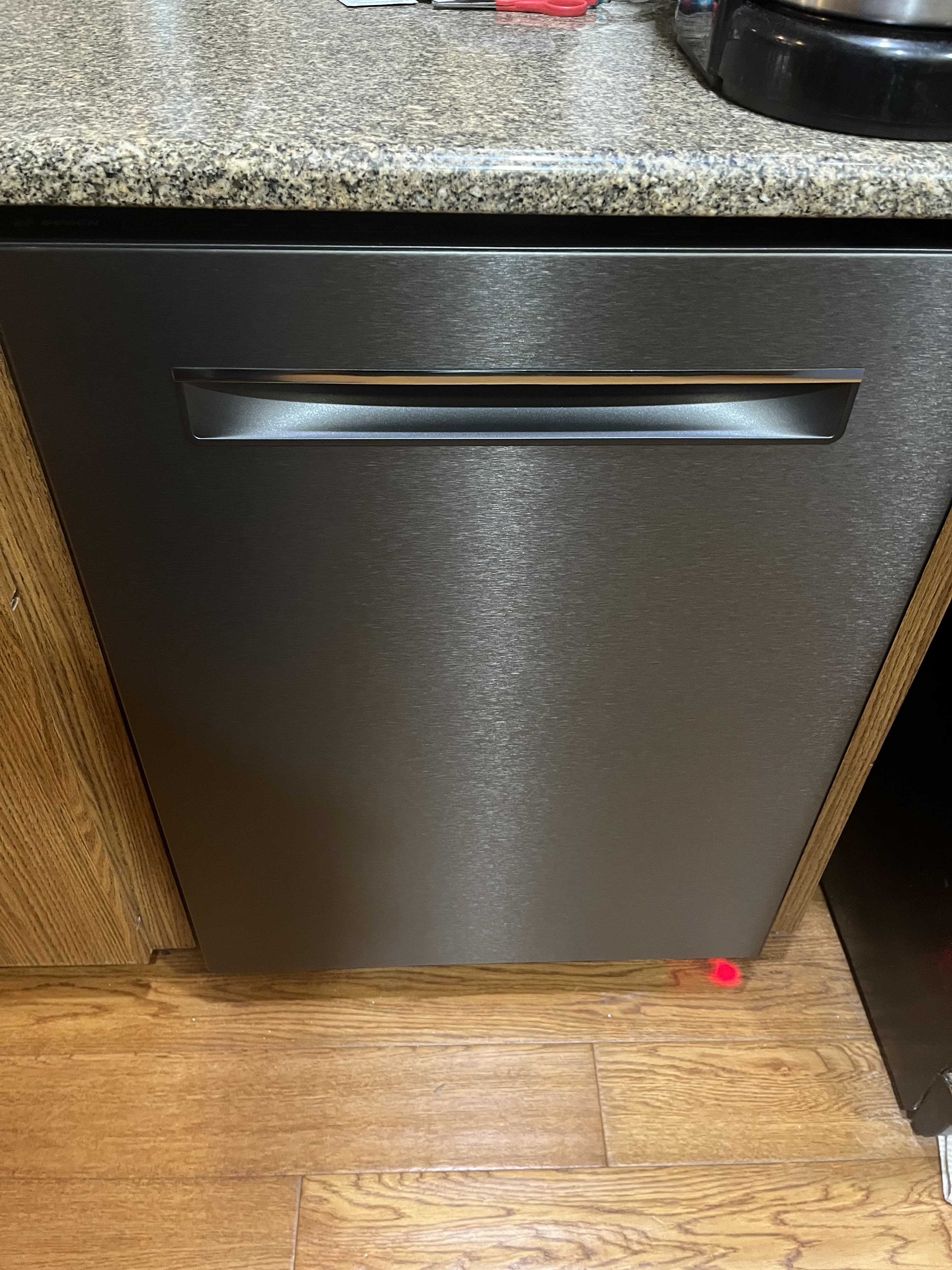
We got the black stainless steel version of the dishwasher and it is a bit more matte looking than our Frigidaire microwave and stove but it still looks very nice and is SOOOO quiet.


Below is FlexSeal I used to seal around the bottom of the area for the dishwasher.


Here is the new electric outlet I installed under the sink cabinet.
Here is the new dishwasher patiently waiting for installation.
And the final outcome!  Yeah!!


I'm glad it is finally here and done but do have to remember this bible verse below.

Hoping everyone's day is blessed!

Scott

Luke 12:15 ESV 

And he said to them, “Take care, and be on your guard against all covetousness, for one's life does not consist in the abundance of his possessions.”

Thursday, July 28, 2022

Performance and Scalability - draft doc

This is something I had started to work on quite a while back and just haven't found/taken the time to really complete it.  

Posting here now as a "draft" just to make it available.  Maybe sometime I can continue work on it once other obligations are completed.


Performance and Scalability


Tuesday, May 17, 2022

GPU, HPC, etc info and resources


Linux Graphics Stack

  • Nice overview
    • https://www.reddit.com/r/archlinux/comments/6la6n5/trying_to_understand_drm_dri_mesa_radeon_gallium/
  • X
    • https://wiki.archlinux.org/title/Xorg

Radeon / AMDGPU Driver

  • https://wiki.gentoo.org/wiki/Radeon
  • https://wiki.gentoo.org/wiki/AMDGPU
  • https://wiki.gentoo.org/wiki/AMDVLK
  • https://www.x.org/wiki/RadeonFeature/
  • https://dri.freedesktop.org/docs/drm/gpu/amdgpu.html#power-dpm-force-performance-level
  • https://www.x.org/wiki/RadeonFeature/#Decoder_ring_for_engineering_vs_marketing_names
  • https://kernel.org/doc/html/latest/gpu/amdgpu/display/display-manager.html

Ubuntu Certification for 20.04 LTS
  • https://ubuntu.com/certified/component/754

Intel Driver

  • https://linuxreviews.org/Intel_Iris
  • https://linuxreviews.org/Intel_graphics

NVidia GPU modules

  • https://github.com/NVIDIA/open-gpu-kernel-modules

GPU

  • https://wiki.gentoo.org/wiki/AMDGPU#Identifying_which_graphics_card_is_in_use
  • https://help.ubuntu.com/community/AMDGPU-Driver
  • lspci | grep -i VGA 
00:02.0 VGA compatible controller: Intel Corporation CoffeeLake-S GT2 [UHD Graphics 630] (rev 02)
01:00.0 VGA compatible controller: Advanced Micro Devices, Inc. [AMD/ATI] Oland [Radeon HD 8570 / R5 430 OEM / R7 240/340 / Radeon 520 OEM] (rev 87)

A confusing aspect of this is that "Oland" is indicated as part of the Southern Islands family but some sites show other information which seems to conflict. This is especially true when you try to look up the individual models listed. The HD 8570 is indicated generally as a rebranded HD 7000 series. The "Southern Islands" family has a codename alias of "Sea Islands" [according to Wikipedia].   

  • Radeon HD 8570
    • https://www.techpowerup.com/gpu-specs/radeon-hd-8570-oem.c1974
      • Oland Sea Islands, Release 2013
    • https://en.wikipedia.org/wiki/Radeon_HD_8000_series
  • Radeon R7 240
    • https://www.techpowerup.com/gpu-specs/radeon-r7-240.c2463
      • Oland Volcanic Islands, Release 2013
    • https://en.wikipedia.org/wiki/Radeon_200_series
  • Radeon R7 340
    • Oland XT, Release 2015
    • https://en.wikipedia.org/wiki/Radeon_300_series
  • Radeon R5 430 OEM
    • https://www.techpowerup.com/gpu-specs/radeon-r5-430-oem.c2893
      • Oland Artic Islands, Release 2016
    • https://en.wikipedia.org/wiki/Radeon_400_series
  • Radeon 520 OEM
    • https://www.techpowerup.com/gpu-specs/radeon-520-oem.c4061
      • Oland Polaris, Release 2017

GPU docs

  • http://amd-dev.wpengine.netdna-cdn.com/wordpress/media/2013/10/SI_3D_registers.pdf
  • http://developer.amd.com/wordpress/media/2013/10/si_programming_guide_v2.pdf
  • http://developer.amd.com/wordpress/media/2013/07/AMD_Sea_Islands_Instruction_Set_Architecture.pdf
  • http://developer.amd.com/wordpress/media/2012/12/AMD_Southern_Islands_Instruction_Set_Architecture.pdf

GPU Firmware

  • https://wiki.gentoo.org/wiki/AMDGPU#Identifying_which_graphics_card_is_in_use
  • ls /lib/firmware/amdgpu/oland_{ce,mc,me,pfp,rlc,smc}
OLAND
radeon/{oland_{ce,mc,me,pfp,rlc,smc}

Debugging / Info

  • https://wiki.gentoo.org/wiki/Radeon
  • https://wiki.gentoo.org/wiki/AMDGPU#Identifying_which_graphics_card_is_in_use
  • DRI_PRIME=1   ; prefix for commands where gpu is secondary
  • amoeba
  • clinfo
  • dmidecode
  • drm_info
  • glmark2
  • glxdemo
  • glxinfo
  • glxgears
  • glxheads
  • GLZ
  • hardinfo
  • lsgpu
  • lshw
  • lsmod | grep -E  "amd|radeon|i915|vesa" 
  • lspci
  • rocminfo
  • sensors
  • vainfo
  • vdpauinfo
  • vkcube
  • vkvia
  • vulkaninfo
  • xrandr
  • xdriinfo

Intel i915 tweak

  • sudo sysctl dev.i915.perf_stream_paranoid=0

VDPAU - Video Decode and Presentation API for Unix

  • https://wiki.gentoo.org/wiki/VDPAU
  • grep -i vdpau /var/log/Xorg.0.log
[    94.821] (II) AMDGPU(0): [DRI2]   VDPAU driver: radeonsi
[    98.102] (II) modeset(G0): [DRI2]   VDPAU driver: va_gl

  • export VDPAU_DRIVER=radeonsi
  • DRI_PRIME=1   ; prefix for commands when gpu is secondary
  • vdpauinfo

VAAI - Video Acceleration API)

  • https://wiki.gentoo.org/wiki/VAAPI
  • DRI_PRIME=1   ; prefix for commands when gpu is secondary
  • LIBVA_DRIVER_NAME=
    • radeonsi ; For amd/ati
    • i965 ; For libva-intel-driver
    • iHD  ; For libva-intel-media-driver
  • vainfo
libva info: VA-API version 1.14.0
libva info: Trying to open /usr/lib/x86_64-linux-gnu/dri/radeonsi_drv_video.so
libva info: Found init function __vaDriverInit_1_14
libva info: va_openDriver() returns 0
vainfo: VA-API version: 1.14 (libva 2.12.0)
vainfo: Driver version: Mesa Gallium driver 22.2.0-devel for OLAND (oland, LLVM 14.0.0, DRM 3.44, 5.17.6-051706-generic)
vainfo: Supported profile and entrypoints
VAProfileMPEG2Simple : VAEntrypointVLD
VAProfileMPEG2Main : VAEntrypointVLD
VAProfileVC1Simple : VAEntrypointVLD
VAProfileVC1Simple : VAEntrypointEncSlice
VAProfileVC1Main : VAEntrypointVLD
VAProfileVC1Main : VAEntrypointEncSlice
VAProfileVC1Advanced : VAEntrypointVLD
VAProfileVC1Advanced : VAEntrypointEncSlice
VAProfileH264ConstrainedBaseline: VAEntrypointVLD
VAProfileH264ConstrainedBaseline: VAEntrypointEncSlice
VAProfileH264Main : VAEntrypointVLD
VAProfileH264Main : VAEntrypointEncSlice
VAProfileH264High : VAEntrypointVLD
VAProfileH264High : VAEntrypointEncSlice
VAProfileHEVCMain : VAEntrypointVLD
VAProfileHEVCMain : VAEntrypointEncSlice
VAProfileHEVCMain10 : VAEntrypointVLD
VAProfileHEVCMain10 : VAEntrypointEncSlice
VAProfileNone : VAEntrypointVideoProc

Vulcan

  • https://wiki.gentoo.org/wiki/Vulkan
  • https://vulkan.gpuinfo.org/
  • https://www.phoronix.com/scan.php?page=news_item&px=RADV-LBVH-Lands
  • vulkaninfo

OPENGL 

  • glxinfo | grep "OpenGL renderer" 
OpenGL renderer string: OLAND (oland, LLVM 14.0.0, DRM 3.44, 5.17.6-051706-generic)

OpenCL

  • https://wiki.gentoo.org/wiki/OpenCL#AMD
  • https://dri.freedesktop.org/wiki/GalliumCompute/
  • https://packages.gentoo.org/packages/dev-libs/intel-compute-runtime
  • https://packages.gentoo.org/packages/dev-util/intel-ocl-sdk
  • https://packages.gentoo.org/packages/dev-libs/ocl-icd
  • https://packages.gentoo.org/packages/dev-libs/rocr-runtime
  • https://packages.gentoo.org/packages/virtual/opencl
  • See ROCm below.
  • clinfo

ROCm OpenCL/HIP/MPI

  • https://en.wikipedia.org/wiki/ROCm
  • https://packages.gentoo.org/packages/dev-libs/rocm-opencl-runtime
  • https://github.com/RadeonOpenCompute/ROCm
  • https://packages.gentoo.org/packages/dev-libs/rocr-runtime
  • rocminfo
    • [update 2022/07/08] This finally doesn't segfault!!! To get to this point I ended up on Linux Kernel 5.18.10-051810-generic and Ubuntu 22.10 Kinetic Kudu along with lots of time messing with installs. Just use the amdgpu that comes with the kernel - don't try to get some external version. The DKMS pain was very high, time consuming and finally I gave up on that and found the bundled-with-kernel pieces worked fine.  I am able to use all 3 of my monitors with my desktop again.
ROCk module is loaded
=====================    
HSA System Attributes    
=====================    
Runtime Version:         1.1
System Timestamp Freq.:  1000.000000MHz
Sig. Max Wait Duration:  18446744073709551615 (0xFFFFFFFFFFFFFFFF) (timestamp count)
Machine Model:           LARGE                              
System Endianness:       LITTLE                             

SYCL

  • https://www.khronos.org/sycl/
  • https://www.khronos.org/sycl/resources
Checking for available devices:
sycl-ls

[opencl:cpu][opencl:0] Intel(R) OpenCL, Intel(R) Core(TM) i7-9700 CPU @ 3.00GHz OpenCL 3.0 (Build 0) [2024.18.7.0.11_160000]

Running a slightly modified version of the Intel OneAPI "vector-add-buffers" C++/sycl sample produces:

Platform: Intel(R) FPGA Emulation Platform for OpenCL(TM)
  Device: Intel(R) FPGA Emulation Device
Platform: Intel(R) OpenCL
  Device: Intel(R) Core(TM) i7-9700 CPU @ 3.00GHz
Platform: SYCL host platform
  Device: SYCL host device
Cannot select a GPU
No device of requested type available. Please check https://software.intel.com/content/www/us/en/develop/articles/intel-oneapi-dpcpp-system-requirements.html -1 (CL_DEVICE_NOT_FOUND)
Using a CPU device
Running on device: Intel(R) Core(TM) i7-9700 CPU @ 3.00GHz
Vector size: 10000
[0]: 0 + 0 = 0
[1]: 1 + 1 = 2
[2]: 2 + 2 = 4
...
[9999]: 9999 + 9999 = 19998
Vector add successfully completed on device.

OpenMPI

  • https://www.open-mpi.org/
  • https://www.open-mpi.org/software/ompi/v4.1/
  • https://en.wikipedia.org/wiki/MPICH

./mpi_hello_world
Hello world from processor scott-z1, rank 0 out of 1 processors

OpenMP

  • https://www.openmp.org/wp-content/uploads/HybridPP_Slides.pdf
  • http://pawangh.blogspot.com/2014/05/mpi-vs-openmp.html

OMP_NUM_THREADS=3 ./hello

Hello World... from thread = 0
Hello World... from thread = 1
Hello World... from thread = 2

X-Windows

  • xdriinfo 
    • usages:
      • xdriinfo
      • xdriinfo options i915
      • xdriinfo options amdgpu
      • xdriinfo options radeon
  • xrandr --listproviders
Providers: number : 2
Provider 0: id: 0x52 cap: 0x9, Source Output, Sink Offload crtcs: 2 outputs: 2 associated providers: 1 name:Unknown AMD Radeon GPU @ pci:0000:01:00.0
Provider 1: id: 0xa9 cap: 0x6, Sink Output, Source Offload crtcs: 3 outputs: 5 associated providers: 1 name:modesetting

Snapshot of GLZ info


Misc Links

  • https://www.anandtech.com/show/16775/amd-moves-gcn-1-2-3based-gpus-and-apus-to-legacy-also-drops-win7-support
  • https://gpuopen.com/learn/amdgcn-assembly/
  • https://kernel.org/doc/html/latest/gpu/amdgpu/display/display-manager.html
  • https://wiki.archlinux.org/title/Kernel_mode_setting
  • https://askubuntu.com/questions/1279420/amd-kernel-modesetting
  • https://ubuntu-mate.community/t/vgacon-disables-amdgpu-kernel-modesetting-amdgpu-init/23001/4
  • https://wiki.archlinux.org/title/AMDGPU
  • https://wiki.archlinux.org/title/ATI
  • https://wiki.debian.org/KernelModesetting
  • https://askubuntu.com/questions/1166054/disables-amd-gpu-kernel
  • https://unix.stackexchange.com/questions/730113/how-does-linux-set-older-gpus-to-use-modsetting-drivers-in-x-server
  • https://wiki.gentoo.org/wiki/AMDVLK
  • https://wiki.archlinux.org/title/Xorg
  • https://man.archlinux.org/man/extra/xorg-server/modesetting.4.en
  • https://dri.freedesktop.org/wiki/ConfigurationInfrastructure/
  • https://dri.freedesktop.org/wiki/DriConf/